
Capture guide
How to take your own Finnish passport photo
You can take the source photo at home using a plain light background, soft frontal light and enough camera distance. The safest setup is another person using the rear camera from about 1.5–2 metres away; OmaPassikuva checks the image before payment and asks for a retake instead of changing your appearance.
Check your photo freeThree tips for a good starting photo
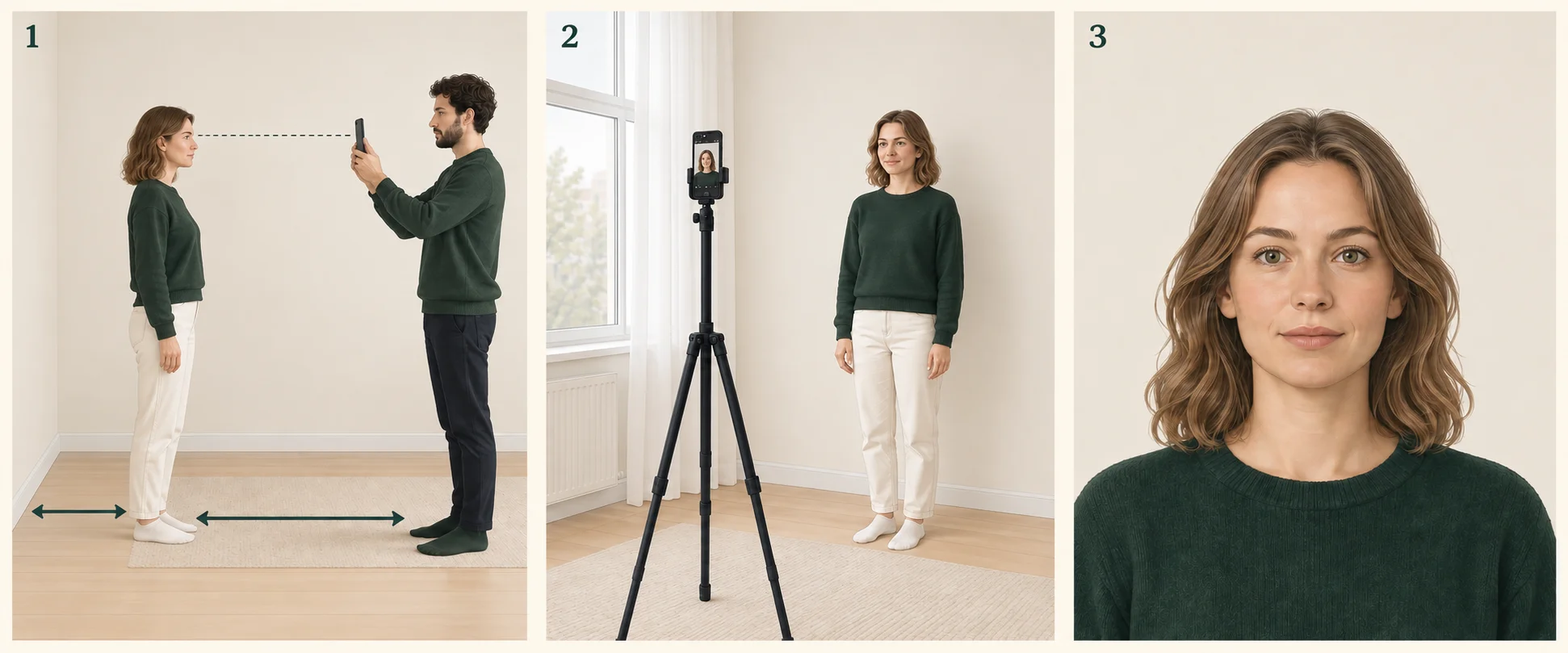
Leave some space
Ask your photographer to stand about 1.5–2 metres away. Leave a gap behind you and keep the camera at eye level.
Face the light
Use soft daylight from in front of you. If you are alone, use a phone stand and timer.
Look straight ahead
Keep your head upright, eyes open and mouth closed. Leave space around your hair and shoulders for cropping.
These illustrations explain the setup. Take your own recent photo without filters.
Prepare the space
- Stand in front of a light, plain wall.
- Leave about one metre between you and the wall to avoid hard shadows.
- Face a window or use even light from the front; avoid strong overhead shadows.
Take the photo with another person
- Ask another person to hold the phone at eye level and use the rear camera.
- Stand about 1.5–2 metres from the camera; move it farther back if the face looks wide or the nose looks prominent.
- Face the camera with a neutral expression, eyes open and mouth closed.
- Leave generous real background around the head for cropping and disable portrait, beauty and background filters.
If you are taking it alone
Place the phone securely on a tripod or shelf at eye level. Use a 3–10 second timer or remote shutter, stand about 1.5–2 metres away and take several frames. Avoid a handheld selfie where possible.
- Check that your full head and shoulders are in frame and that the camera is not pointing up or down.
- Do not use digital zoom, portrait mode or filters.
Choose the source
Use a sharp, evenly lit image. Do not crop or edit it yourself: the service uses only source pixels for the official crop and size.
Quick tip: take a few photos, choose the sharpest and upload it unchanged for checking.
Frequently asked questions
Can I use a selfie?
A selfie is possible, but short camera distance can distort the face. A rear-camera photo taken by another person is safer.